Startup Omni Relationship Management
The Relationship Graph Operating System for Startups
Customers, investors and partners live on one set of records, and so does everything that follows them: the NDA, the proposal, the signature, the invoice, the project, and the room you share the files in. The tools that make a young company look established, at a price a young company can actually pay.
Priced for bootstrapped founders starting at $19/mo with 5 users included.
Built for founders who would rather be selling or raising than filing.
The problem
Your relationships are scattered across tools that never talk
Your customer pipeline lives in a CRM or a spreadsheet, your raise lives in another tracker, and your partners live in email threads and memory. The spreadsheet got you here, but every relationship that falls between those tools is one you pay for. And the tools that make a young company look established, the proposal builders, the e-signatures, the client portals and the payment pages, have always been priced for companies much further along.
Sales CRMs price you out
Per-seat plans, feature gates, and startup discounts that expire into a renewal cliff. Tools built for enterprises start charging you the moment you grow.
Investor tools sit in their own silo
Your raise tracker knows nothing about the customer intro that same investor made last month, so warm paths go cold and you retype context you already had.
Partner tools are built for later
Dedicated partner platforms are priced for companies far past your stage, so your early partnerships end up in a doc somewhere, waiting to be forgotten.
One graph, many roles
One record can be a customer, an investor, and a partner at once
In the real life of a startup it often is, so Storm OS keeps a single record for every person and company you work with, then layers customer, investor, and partner roles on top, each with its own engagement level, fit score, and activity score.
- CustomerSales pipeline, deal amounts, weighted forecast, billing structures.
- InvestorYour raise, the way it actually runs: warm intros through wired funds.
- PartnerPartnerships move on agreement checklists, since a partner deal rarely has a dollar figure to forecast.
The whole lifecycle
Meet them, win the deal, deliver the work, and keep them well served
Most tools take one slice of a relationship and hand you off for the rest, so the story of one customer ends up spread across five logins. Storm OS follows the whole arc on a single record, and every step opens already knowing what happened in the one before it.
- Step 01Meet someone
Add the person once, and their record starts collecting the notes, files and history that everything later draws on.
One record
- Step 02Work the deal
The deal lives on their record, with line items, billing frequencies and a payment schedule that describe the contract you actually intend to sign.
A real schedule
- Step 03Send the proposal
The proposal is built on the deal, priced from the same lines, and signed by your client with a signature or a one-time code.
Signed, sealed
- Step 04Invoice it
Each invoice is raised from a milestone your client already agreed to, and the money lands in your own accounts.
Paid on time
- Step 05Deliver the project
Close the deal and start the project right there, carrying the customer, the stakeholders and the documents with it.
Work underway
- Step 06Keep them well served
Storm Service arrives in November and puts support cases on the same record as every step above.
November
Six steps, one record, and nothing retyped between them.
Pipelines that fit in a pocket
All three pipelines, ready the day you sign up
Sales, investor, and partner pipelines arrive with sensible stages and weightings already in place, and every stage, probability, and staleness threshold is yours to change without writing code. Stages stack down the screen instead of sideways, so the whole pipeline fits on your phone.
- Drag a card to move a deal, with stage requirements enforced on the way in.
- Stale deals raise their hand: every card carries a health meter and a reason in plain words.
- Add as many pipelines as you need, per product line, region, or experiment.
The money on a deal
A deal holds the whole billing structure, from line items to payment schedule
Nearly every CRM gives a deal one amount field and leaves the real shape of the contract in a spreadsheet. Storm OS puts the shape on the deal: line items with a quantity and a unit price, a billing frequency on each line, a discount measured against your list price, and a payment schedule of dated milestones.
One time, monthly, quarterly, annually, on the line rather than the deal
A real contract is usually a setup fee and a subscription sitting next to each other, so each line carries its own frequency instead of the whole deal having to pick one.
A schedule of milestones, split any way you actually sell
A deposit on signature, a payment on acceptance, the balance on completion. Take one of the ready splits or build the schedule by hand, then edit any milestone’s date, amount and wording. The parts always add back to the exact total, down to the last cent.
Nobody ever types a total
One-time, recurring, and total contract value are worked out from the line items every time you look, down to the exact cent. The same lines then fill the proposal your client signs and the invoices you send, so the number they are quoted, the number they sign, and the number they pay are always the same number.
Proposals and invoices
Write the proposal, get it signed, send the invoice, take the money
Almost no CRM will let you write the document. You export a quote, rebuild it somewhere pretty, upload it to a signing service, then raise the invoice in a fourth place and reconcile all four by hand. Storm OS does the whole run on the deal itself.
A real document, in your branding
A block builder on the deal: cover, headings, text, images, two columns, terms, the pricing table and the payment schedule. Your logo, your colors, your fonts, locked in when it goes out, so a rebrand next year cannot rewrite what somebody already signed.
PDF, Word and the web page, all from one original
That way the three can never disagree with each other, and the tracked link tells you who opened it, when, and what they downloaded, which an emailed PDF cannot.
Signed with a code, sealed, and countersigned
Your client signs with a one-time code emailed to them, and the moment they do, a sealed copy of exactly what was signed is kept: blocks, prices, terms. You countersign from your side and the deal moves. Already have a contract you like? The Proposal Agent reads it and hands it back as a proposal draft.
Storm Finance Beta
Invoices raised from the schedule they already agreed to
An invoice starts from a milestone on the deal, so the line, the amount and the words your client already read come with it.
- It goes out with its own payment page, at a link that carries nothing but that invoice.
- The payment page takes cards through your own Stripe account, connected once, so the money moves straight from your client to you.
- It also carries any other way you get paid, Zelle, Venmo, PayPal, your bank details, or a payment link you already use, dropped in once and offered on every invoice after that.
- A card payment marks the invoice paid on its own, and a payment made any other way is marked by hand with the method recorded.
- Every invoice and every payment sits on the deal and the customer record, so a year later the whole story is in one place.
Storm Project
Project management, on the deal it came from
Storm Project is a real project manager: boards, tasks with owners and due dates, dependencies, and a calendar. What makes it different is where it lives. A project hangs off the deal, the company or the person it came from, so the rollout you promised sits on the record of the customer you promised it to, instead of in a separate tool that has never heard of them.
Start one from a deal, a company, or a person
Close an opportunity and Storm OS offers to start the project right there, carrying the customer and the stakeholders with it. Anyone who can see a record can start a project from it, because the person delivering the work is often not the person who sold it.
A board, a list, and a calendar over the same tasks
The board opens first, with columns you name and color and cards you drag. Every task has its own owner, status, start and due dates, priority, description, and the task it is waiting on. List and calendar are one tap away on the same project.
Health you can read across the whole portfolio
Progress is counted from the tasks themselves, so it cannot flatter anybody. Every project carries a health meter you can read at a glance, and it never relies on color alone, and Tasks pulls your project tasks in beside your relationship tasks so there is one list of what needs you today.
The project brief
It reads the documents you give it, and keeps a brief that stays current
Hand a project the statement of work, the kickoff transcript and the change request. It folds them into one standing brief: what is settled, what nobody has answered yet, who owes what and by when, and the client's own words for things.
- Each new document is read against the brief instead of the whole pile, so the fortieth transcript costs what the first one did, and reads better because the brief knows more by then.
- Because the brief knows what was agreed, it can flag what was not: a task nobody wrote down, a scope change buried in a call, a risk worth saying out loud.
- All of it arrives as a proposal you accept or ignore. Nothing is written into the project until you say so.
- Project tasks reach the same notifications, digest, and phone as everything else.
- The Context Agent reads a project the way it reads a deal, then says where it stands.
- Delivery people can be given the project without being given your pipeline.
Storm Marketing Beta
Email from your own domain, reported on the records it reached
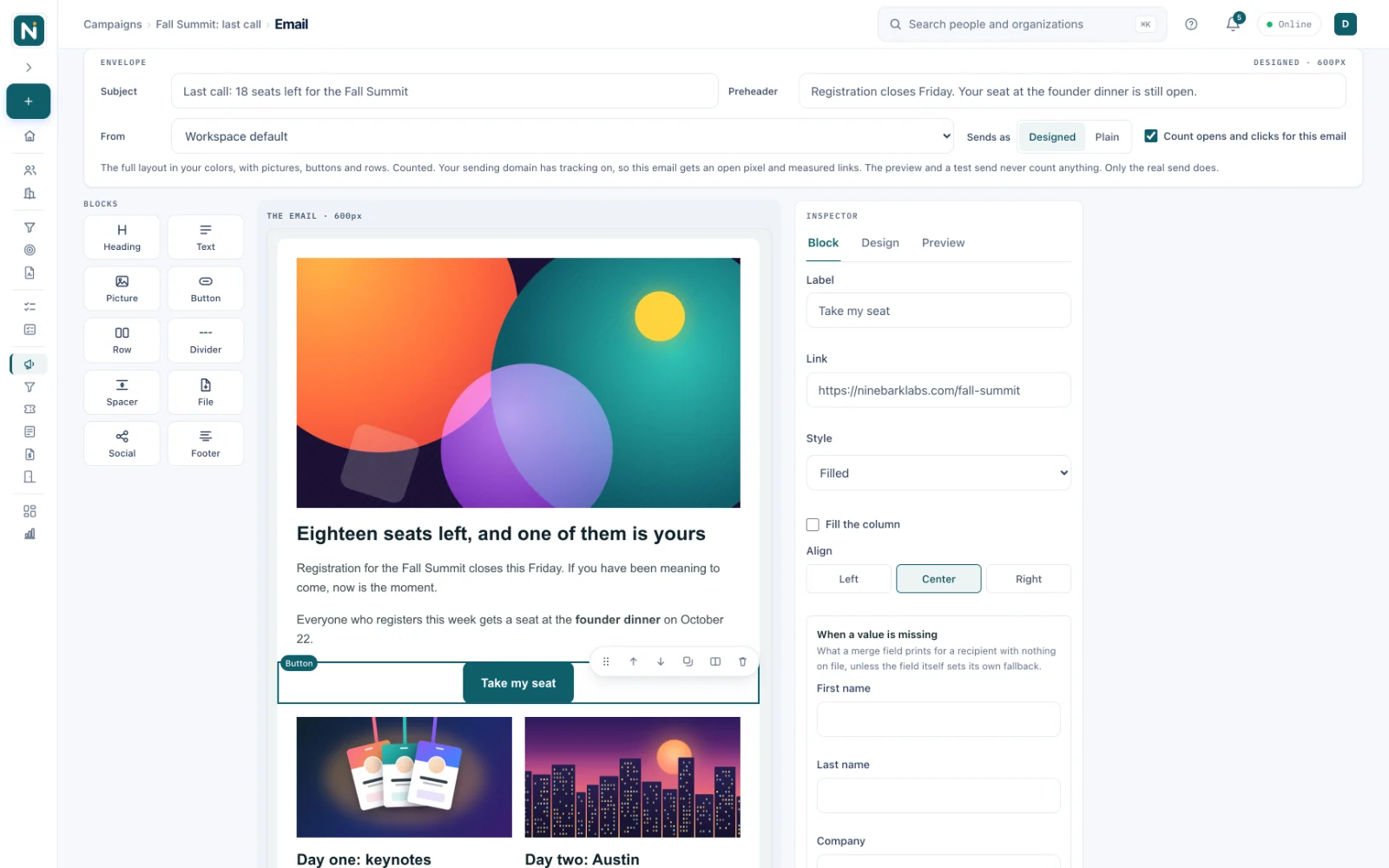
Design the email by dragging blocks onto the email itself, send it from your own domain to a segment that keeps itself current, and every delivery, open and click lands on the people and deals it touched.
- The canvas is drawn by the same code that sends the message, so what you design is what arrives.
- It goes out from an address on your own domain, with your footer and nothing of ours in it.
- Delivered, opened and clicked, person by person, on the campaign and on every record.
- First touch and last touch on every closed deal, so you can see which campaign opened the door.
- Landing pages with the campaign's form built in, on your own domain when you connect one, and tickets and check-in for the events you host.
- See Storm Marketing
The agents
Five agents, each with a job of its own
These five read what you actually have, they tell you where they got it, and none of them can change a record on their own. They are on from the start, and an admin can switch them off at any time.
Context Agent
Summaries
Opens a record and says where the relationship actually stands, in four sentences. It goes past the fields you can already see to what they add up to, what moved last, and what is still waiting on somebody.
Research Agent
Web research
Fills the blanks on a contact or a company from business data providers and the web, and shows where every value came from. No field changes until you tick it.
On-Task Agent
Daily assistant
Watches what is due and what has gone quiet, and sends one short email in the morning. On the days nothing needs you, it sends nothing at all.
Project Context Agent
Project context
Reads the statements of work, transcripts and contracts you put on a project and keeps one standing brief. Ask it, and it finds the work they imply and offers it as tasks you accept or ignore.
Proposal Agent
Contract imports
Reads a contract you already sell with and hands it back as a proposal draft you can edit, with the pricing taken from the deal instead of retyped. A PDF or text contract uses about 11 AI credits, and most Word files convert without using any.
It gets better because you tell it to
Every answer carries a thumbs up and a thumbs down
Thumbs down and write one line about what it should have said, and the next answer takes it into account. That happens inside your workspace and stays there. Sharing anything at all with us is a separate switch that starts off, and even then it is which screen, which direction, and the line you wrote, with no record and no name attached.
- It is on from the start, an admin can turn it off at any time, and nothing is sent anywhere while it is off.
- Bring your own Anthropic key and the agents you move onto it run on your account. Background reading of documents already filed, and the lookups with data providers, stay on ours.
- We never train a model on your records, and Anthropic’s terms forbid it from training on what we send.
Context building
It reads what you have already written, including inside your files
An agent is only ever as good as what went into it, so the real work is the context. Attach a contract and Storm OS reads the words inside it. Type a note after a call and it counts. Link a person to a company and the connection is part of the picture. None of that needs tagging, indexing, or a second tool.
- PDFs and Word files are read on upload. Search reaches the words inside the contract, so you can find a clause as easily as a filename.
- Notes are searchable and readable. The thing somebody typed after the call is the most valuable text on a relationship record, and in most tools it is the least reachable.
- The connections are context too. Who this person works for, which deals they are on, and what has happened around them.
- Nobody sees what they should not. A search only ever returns what you already had permission to open.
Context also moves between the modules: the deal's line items price the proposal, the proposal's schedule raises the invoice, and a won deal starts the project with the account, the stakeholders and the documents already on it, so no part of Storm OS ever opens on a blank page about a customer the rest of it knows well. It compounds on the record too, since one with a single note and no files gets a short answer that says so, and the same record six months later, with the contract, the meeting history and four people attached, gets an answer worth reading before you walk in.
Private Rooms Beta
Send one page that holds everything they need
A Private Room is a page with your name and your logo on it, holding the documents one person or one company should see. They sign in with their own email and a password they choose, and you find out what they actually opened. There is no shared drive to manage, no seat in your workspace to pay for, and no link that keeps working after the deal is dead.
Deal Rooms for investors
The model, the cohorts, the cap table and the incorporation documents in one place, with an expiry date. When you see that a partner read the financials twice and never opened the roadmap, you know what the next call is about.
Onboarding Rooms for customers
A personalized room per account, holding the plan, the contract and the technical documents their team keeps asking you to resend. Everyone linked to the company gets in, and loses access the day they leave it.
Share Rooms for partners
Co-marketing assets, brand files and the joint pipeline documents, in a room you can close without chasing anyone down. Nobody needs a seat in your workspace to read a PDF.
- Grant one person or a whole company, and everyone connected to them follows along.
- Every visit, every folder and every download is recorded against a name.
- Close a room in one click and keep the record of what was shared with whom.
Connected
Four integrations are live today, and more are on the way
You can connect them this afternoon, and the roadmap below says when the next pieces arrive.




Mailchimp
Send a campaign to a Storm segment and keep the audience in step, both ways.
Sign in with Google
One tap in, for you and everyone you invite.
Claude
The agents run on Claude, from Anthropic. Bring your own Anthropic key and the usage is yours.
Stripe
Card payments on your invoices, charged on the Stripe account you already have.
Email goes out from Marketing Beta on its own, from your own domain. Connect Mailchimp and the same campaigns send through your Mailchimp account instead, with the audience kept in step both ways.
Coming next
- NovemberStorm Service for its first group of beta customers, and API access in private beta
- DecemberThe MCP server and the Workflow and Automation Studio, both in private beta
- Early 2027A Storm OS Zap, so Zapier can reach your relationship graph
More email platforms, Slack, Notion, Google Drive and Dropbox are on the way, and the whole list is on the integrations page.

Built for the founder's pocket
Install it from the browser, with no app store, no download, and no IT ticket
Open Storm OS on your phone or your laptop, choose install, and the icon lands on your home screen next to everything else. It opens full screen like any other app, because it is one.
- It keeps working when the signal drops. Your working set lives on the device, so records open in a parking garage and at 30,000 feet.
- Edits you make offline are kept safe on the device and sent the moment you are back, with a small counter showing how many are waiting.
- If somebody changed the same record while you were away, you are shown the conflict instead of one version quietly winning.
- It updates itself the next time you open it, so there is never a store review sitting between a fix and you.
- Phone and desktop are the same app, designed for the phone first, so the phone version never feels cut down.
3 pipelines
customers, investors, partners
1 record
per relationship, however many roles it holds
30 days
free trial, no credit card
from $19/mo
5 users included, paid yearly
Plain pricing
One plan, priced for the size you are now
For that you get the paperwork of a company ten times your size: proposals your clients sign, invoices they can pay on the spot, and a branded room your investors log into. $19 a month paid yearly, or $24 a month if you would rather pay monthly, with 5 users included and additional users from $4 a month. The full math is on the pricing page.